
Beauty Guides
How to Use the Bare It | IPL Hair Removal — Practical Guide
A practical guide to how to Use the Bare It | IPL Hair Removal. Compare the key concepts, product formats and points to check before choosing.
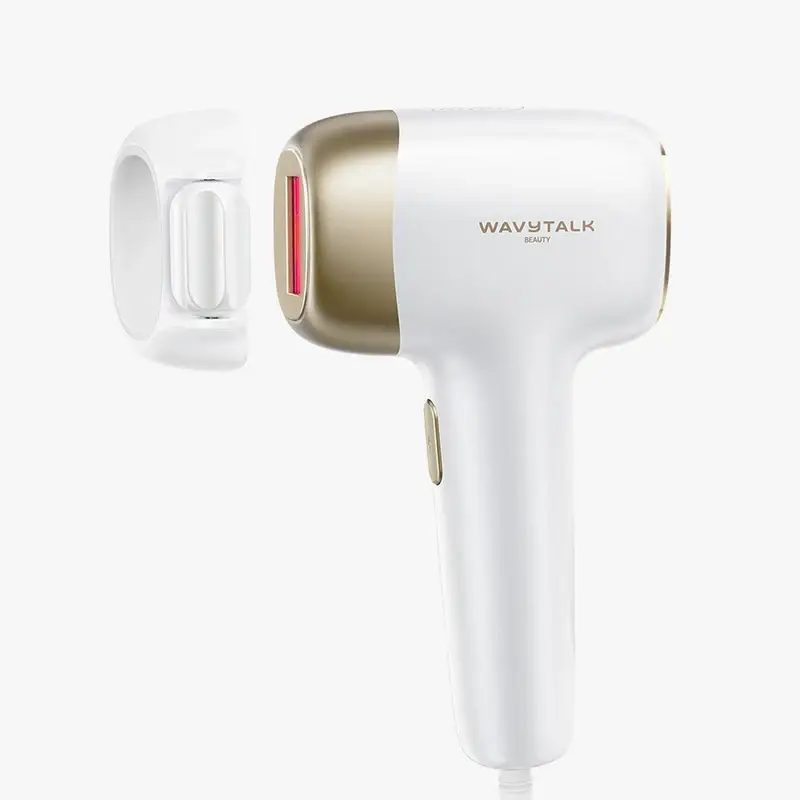
If you are using the Bare It IPL Hair Removal Device for the first time, the best approach is to follow a simple routine: prepare your skin, choose the right mode, start at a comfortable level, and stay consistent. The Bare It is designed for multiple treatment areas, including the face, body, and bikini line, making it a practical option for at-home IPL hair reduction.
If you are unsure whether your skin is suitable for an IPL hair removal device, you can take an IPL compatibility test for a preliminary assessment.
4. How to Use the Bare It Step by Step
5. Manual Flash Mode vs. Auto Flash Mode
6. Which Energy Level Should You Start With?
7. How Often Should You Use It?
8. Tips for Better IPL Results
Bare It - What is IPL hair removal?
IPL hair removal stands for Intense Pulsed Light hair reduction. It works by delivering light energy to the hair root to help reduce regrowth over time. Unlike shaving, which only removes hair at the surface, IPL is designed to target the hair growth cycle for longer-lasting results.
The Bare It is an at-home IPL hair removal device made for areas such as the face, body, and bikini line. It is designed to give users a more convenient way to manage unwanted hair at home with adjustable settings and area-specific modes.
Before your first session, check that you have all the included accessories
Bare It IPL Hair Removal device
The device is designed for multiple treatment areas, including
Tip: Read the instruction manual carefully for placement guidance, and choose the appropriate treatment mode for each area. For smaller or more sensitive areas, start with a lower intensity level and proceed with extra caution.
How to Use the Bare It Step by Step
Step 1: Read the user manual first Before your first treatment, read the included user manual and quick guide. This helps you understand the device settings, recommended usage, and basic safety instructions.
Before your first treatment, read the included user manual and quick guide. This helps you understand the device settings, recommended usage, and basic safety instructions.
Step 2: Shave the area you want to treat Shave the treatment area before using the device. Do not use IPL on long surface hair. Shaving helps the light target the hair root more effectively and makes treatment more comfortable.
Shave the treatment area before using the device. Do not use IPL on long surface hair. Shaving helps the light target the hair root more effectively and makes treatment more comfortable.
Step 3: Clean and dry your skin Make sure your skin is clean, dry, and free of lotion, body oil, deodorant, or heavy skincare products before treatment.
Make sure your skin is clean, dry, and free of lotion, body oil, deodorant, or heavy skincare products before treatment.
Step 4: Put on the protective glasses Wear the protective glasses before starting your session, especially when treating areas near the face.
Wear the protective glasses before starting your session, especially when treating areas near the face.
Step 5: Plug in the device and power it on Connect the device, turn it on, and get ready to choose your treatment settings.
Connect the device, turn it on, and get ready to choose your treatment settings.
Step 6: Choose the right mode for the treatment area Select the mode that matches the area you want to treat: Face mode for smaller facial areas Body mode for larger areas like arms and legs Bikini mode for the bikini line and other more sensitive areas
Select the mode that matches the area you want to treat
Face mode for smaller facial areas
Body mode for larger areas like arms and legs
Bikini mode for the bikini line and other more sensitive areas
Step 7: Start with a lower energy level If this is your first session, start with a lower energy level and increase gradually only if your skin feels comfortable. This is especially important for sensitive areas.
If this is your first session, start with a lower energy level and increase gradually only if your skin feels comfortable. This is especially important for sensitive areas.
Step 8: Hold the device flat against the skin Place the treatment window fully against the skin and keep the device close to a 90-degree angle. This helps create even contact and more consistent coverage.
Place the treatment window fully against the skin and keep the device close to a 90-degree angle. This helps create even contact and more consistent coverage.
Step 9: Choose manual flash or auto flash mode Use the flash mode based on the size of the treatment area: Manual Flash Mode for smaller, more detailed areas Auto Flash Mode for larger areas like legs or arms
Use the flash mode based on the size of the treatment area
Manual Flash Mode for smaller, more detailed areas
Auto Flash Mode for larger areas like legs or arms
Step 10: Move area by area without rushing Treat one section, then move to the next in a steady pattern. Avoid random movement so you do not miss spots or overlap too much.
Treat one section, then move to the next in a steady pattern. Avoid random movement so you do not miss spots or overlap too much.
Step 11: Moisturize after treatment After your session, apply a gentle moisturizer if needed. This can help keep your skin feeling comfortable after IPL treatment.
After your session, apply a gentle moisturizer if needed. This can help keep your skin feeling comfortable after IPL treatment.
Step 12: Store the device in a dry place Turn the device off, unplug it, and store it safely in a dry place. Use the storage bag to keep the device and accessories together.
Turn the device off, unplug it, and store it safely in a dry place. Use the storage bag to keep the device and accessories together.
Manual Flash Mode vs. Auto Flash Mode
Best for smaller or more detailed areas where you want better control over each flash.
Best for larger treatment areas where you want a faster and smoother routine.
Which Energy Level Should You Start With?
Start with a low setting if you are a first-time user, treating a sensitive area, or simply unsure how your skin will respond. Once you feel comfortable, you can gradually move to a higher level if needed.
It is recommended to begin with the lowest setting and gradually increase the intensity as needed once you feel comfortable, ensuring a safer treatment experience.
You could try the following pattern
After that, you can reduce frequency further as needed for maintenance, depending on your hair growth and results.
Consistency matters. IPL works best when you follow a regular schedule instead of using the device only occasionally.
Stay consistent. Regular use matters more than occasional high-intensity use.
Always shave before treatment. This helps the device work more effectively.
Use the right mode for each area. Face, body, and bikini areas should not all be treated the same way.
Start at a comfortable level. Build up gradually instead of going too high too soon.
Keep the device flat against the skin. Proper contact helps improve coverage.
Finish with basic aftercare. Moisturizing after treatment can help with comfort.
Using the device on unshaved hair
Starting at a level that feels too strong
Using the wrong flash mode for the area
Skipping sessions and not following a routine
Not wearing the protective glasses
Storing the device carelessly after use
The best way to use the Bare It IPL Hair Removal Device is to keep your routine simple and consistent: shave first, clean and dry the skin, wear the protective glasses, choose the right mode, hold the device flat against the skin, and follow your treatment schedule.
Over time, this makes the routine easier to repeat and helps users get better long-term IPL results at home.
Q: How do you use the Bare It IPL hair removal device?
A: To use the Bare It, first shave the treatment area and make sure your skin is clean and dry. Put on the protective glasses, choose the correct mode, start with a lower energy level, and hold the device flat against the skin. Use manual flash mode for smaller areas and auto flash mode for larger areas. After treatment, apply moisturizer and store the device in a dry place.
A: Yes. You should shave the treatment area before using the Bare It. Shaving helps the device target the hair root more effectively and makes the treatment more comfortable.
A: Choose the mode based on the treatment area. Face mode is best for smaller facial areas, Body mode is best for larger areas like arms and legs, and Bikini mode is best for the bikini line and other more sensitive areas.
Q: What is the difference between manual flash mode and auto flash mode?
A: Manual flash mode is better for smaller or more detailed areas where you want more control over each flash. Auto flash mode is better for larger areas like legs or arms because it makes the treatment process faster and more efficient.
A: If you are using the Bare It for the first time, start with a lower energy level and increase gradually only if your skin feels comfortable. This is especially important when treating sensitive areas.
A: A practical routine is to use the device 3 times per week during the first month and 1 time per week during the second month. After that, you can reduce frequency as needed for maintenance, depending on your results and hair regrowth.
A: Yes. After treatment, you can apply a gentle moisturizer to help keep your skin comfortable.
A: After use, turn the device off, unplug it, and store it in a dry and safe place. You can use the included storage bag to keep the device and accessories together.
Black Friday Deal: Up to 54% Off Sitewide
Ready to upgrade your routine? Shop Wavytalks's best-selling hair and beauty tools during Black Friday Deal and enjoy Up to 54% Off Sitewide.
Plus, get free fast shipping on $45+ U.S. orders. It's the time to save on your next styling essential.
Questions & discussion