
Beauty Guides
Microdermabrasion machines for at-home and professional use — Practical Guide
A practical guide to microdermabrasion machines for at-home and professional use. Compare the key concepts, product formats and points to check before choosing.
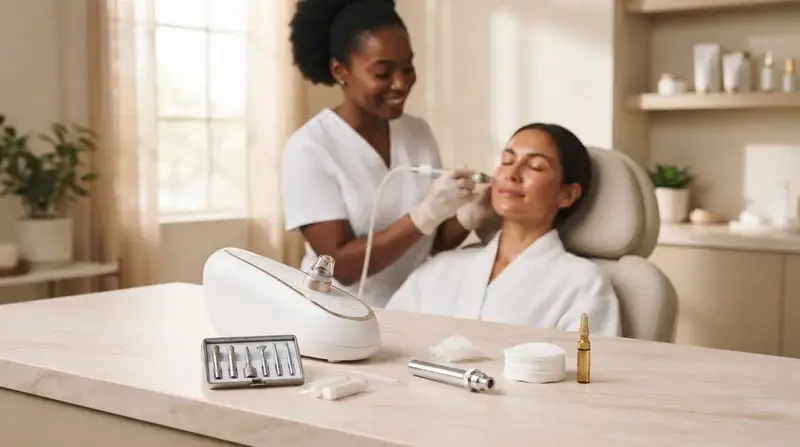
An at-home microdermabrasion machine may suit you if you want controlled exfoliation and are prepared to follow its instructions carefully. It won’t reproduce every aspect of a professional treatment, but it can add a device-based step to your home routine. The right choice depends on your skincare goals, the device design, and how comfortable you are using and maintaining it.
When comparing a home tool with professional equipment, consider what its features actually do. Tips, suction controls, filters, and kit contents affect how a device operates and how you maintain it, so the practical details matter more than a long feature list.
This guide covers when an at-home tool may fit your routine, how device types and attachments differ, and what to know about controls, filters, and kits. It also explains careful use and when a professional setting may better suit your goals.
Choose a device based on your skin’s needs and your comfort with at-home exfoliation, not just the number of features.
Understand how crystal and diamond systems differ so you can compare the exfoliating method and upkeep.
Use the right tip and follow the device’s instructions for settings and movement; short, even strokes are recommended for diamond tips.
Keep filters and accessories in good condition, and clean, disinfect, and safely store equipment after use.
Compare what each kit includes, then consider a hydrating follow-up product that fits your routine.
Are at-home microdermabrasion tools worth it?
Crystal and diamond microdermabrasion machines
Device attachments, tips, and settings
Replacement filters and accessories
At-home microdermabrasion devices and kits
Advanced Microneedling Serum SD - Control Salmon DNA Ampoule Serum
An at-home device may suit you if you want a controlled exfoliation step and can follow the instructions. Before choosing, compare its tip, suction controls, and maintenance requirements with your skin’s sensitivity and your goals.
Choose based on your main concern and comfort with device use, not the number of settings. If your skin is easily irritated, look for adjustable suction and start at the gentlest setting permitted by the instructions. For rough texture or dullness, compare diamond-tip and crystal systems, then consider which method feels manageable in your routine.
Professional licensing requirements for microdermabrasion vary by state and may depend on the service and the operator’s scope of practice. Check the rules that apply where you work before offering professional services.
Acne-prone skin needs care because friction and suction may aggravate tender or inflamed areas. Don’t pass a tip over open, painful, or actively inflamed blemishes. If clogged pores are your main concern, consider whether mechanical exfoliation suits your routine instead of assuming stronger suction will help.
Keep your first use simple and observe how your skin responds afterward. Avoid adding another exfoliating step to the same routine. Spacing out steps makes it easier to identify what may be linked to discomfort or visible irritation.
To use a tool at home, start with clean, dry skin and read the device instructions. Choose the gentlest suitable setting, keep the tip moving, and follow the directions for each pass. Clean and disinfect the equipment as instructed, then store it safely after disinfection.
Use the device only as often as its instructions recommend. Don’t increase frequency to chase faster results. Pause if irritation develops, and wait until your skin feels comfortable before considering another session. After serious exfoliation, use sunscreen with at least SPF 30 during the day.
Possible effects after exfoliation include temporary redness, dryness, tightness, or sensitivity. Excessive pressure, repeated passes, or using a tip on irritated skin can cause unnecessary friction. Follow the device directions, don’t linger over one spot, and stop if the session becomes uncomfortable.
An at-home tool may suit a simple routine, but it isn’t right for every concern or skin condition. Skip a session if your skin is already irritated or tender rather than increasing suction. Professional equipment also requires careful technique and an operator authorized to provide the service in that location.
Crystal and diamond systems exfoliate through different contact methods. Before choosing a microdermabrasion machine, compare how each applies abrasion, manages residue, and suits the treatment area.
A crystal-based system propels exfoliating crystals through a handpiece while suction draws away loose material. The crystal stream and vacuum work together, so move the handpiece steadily across the treatment area. For example, consider how easily the system reaches the sides of the nose, where a larger applicator may feel less precise.
Some professional systems use aluminum oxide crystals. Unlike a fixed abrasive surface, loose crystals make handling and cleanup part of the workflow. Compare the machine’s crystal delivery and collection process, then follow the manufacturer’s directions for handling and replacing materials. A crystal system may suit providers who prefer this method and can manage the additional cleanup.
Before choosing a crystal system, look at how the stream is contained and removed. A stable handpiece grip can help maintain consistent contact, while clear operating instructions make setup easier to repeat. Consider the treatment area, too: broad surfaces and narrow facial contours place different demands on handpiece control.
Diamond systems use an abrasive-tipped wand rather than a stream of loose crystals. The tip contacts the skin as suction removes surface debris, making the handpiece the main point of control. Diamond tips vary in texture and shape, so compare the options supplied with a device and match them to the intended treatment area.
During use, move the diamond tip in short, even strokes, as the product instructions recommend. Keep the handpiece moving instead of pausing over one spot, and follow the device’s directions for pressure and suction. A smaller tip may offer more control around narrow facial contours, while a broader tip covers larger areas more efficiently.
Because the abrasive surface stays attached to the wand, diamond systems avoid loose crystals during treatment. They still require careful maintenance: clean the tip according to its instructions. For a professional setup, compare replacement-tip access and how to keep each attachment clean between uses.
In practice, crystal systems use propelled abrasive material, while diamond systems use a fixed abrasive tip. The choice comes down to workflow: handling and cleaning crystals, or selecting and maintaining attachments. With either type, follow the manufacturer’s instructions rather than assuming settings transfer between machines.
If you’re also comparing separate skin-device approaches, explore microneedling devices and supplies as a distinct category, not as an add-on to the same exfoliation session.
Attachments determine the contact surface, while controls affect how the device operates. Compare compatibility, instructions, and maintenance requirements before settling on a setup.
Tips vary in shape, abrasive surface, and intended use. Check the device manual for compatible attachments and the areas each tip is designed to reach. A narrow shape may offer more control around small contours, while a wider one covers a broader area. Treat these as selection factors, not proof that a tip fits every device.
Disposable microdermabrasion tips are sold in bags of 50. Before using one, check its package for the model or handpiece it fits, then follow the device’s installation directions. Don’t rely on appearance alone: tips with similar shapes can still have different connection requirements.
Keep attachments organized by model and use. For example, label a storage container with the device name and store its compatible tips together. This makes it easier to choose the right part during setup and reduces mix-ups when a room has more than one device.
Depending on the machine, controls may adjust suction or another operating function. Read the manual to learn what each control does before powering on the device. Labels can mean different things across models, so don’t transfer a number or position from one machine to another.
Look for clearly marked controls and instructions that explain how each setting relates to a specific operating step. For example, the manual should explain which control to use during setup and how to adjust it safely. These details make the device easier to operate consistently at home or in a professional room.
Before starting, confirm that the installed tip matches the device, then choose settings according to its instructions. Record the model and settings you used, especially if several machines are available. This gives you a reliable reference without assuming that identical-looking controls work the same way.
Choose features you can operate and maintain. A clear display, secure handpiece connection, and accessible instructions may matter more than extra controls. Review the manual before purchase or setup so you understand the device’s functions and can plan for compatible attachments.
Filters and replacement parts help a microdermabrasion system manage debris and maintain airflow. Match each replacement to the machine model, and follow its maintenance instructions rather than relying on a universal schedule.
A filter catches particles pulled through the handpiece during use. In a crystal system, these may include spent crystals and skin debris; other designs may collect different materials. Check the device manual to identify the filter type and location and learn the correct replacement procedure.
Replace filters according to the manufacturer’s directions. A visibly loaded filter, reduced suction, or debris escaping its usual path may signal that the system needs attention. These signs alone don’t identify the exact fault, so inspect the filter and airflow path before using the machine again.
Other parts vary by model. A system may use tubing, seals, handpieces, or collection components, but don’t assume these parts are interchangeable. Use the model name and part description in the manual when ordering replacements. For example, compare the filter’s shape and connection point instead of choosing a part based only on appearance.
Keep a simple maintenance record that notes the model, filter changes, and any performance issues. This helps you spot patterns, such as reduced suction after a filter change or recurring blockages. Follow the manufacturer’s troubleshooting steps before replacing other components.
In a home, equipment should be properly cleaned and disinfected, then stored safely, according to the Centers for Disease Control and Prevention. Follow the device’s own instructions for surfaces, removable parts, and approved cleaning methods. Don’t assume one cleaning product suits every handpiece or filter housing.
After each session, follow the manual’s sequence to remove debris, clean reusable parts, and check the tubing and handpiece. Keep disposable items separate from reusable accessories. If a component is labeled for single use, don’t return it to use after cleaning.
Store accessories in a clean, dry place where dust and handling won’t contaminate treated surfaces. Keep replacement filters in their original packaging until needed, and separate clean parts from used attachments. A labeled container for each category makes setup easier to repeat.
In professional rooms, build maintenance into a consistent workflow. Record the cleaning step, inspect the filter housing, and confirm the handpiece is ready before the next appointment. These checks can help you notice a loose connection or damaged accessory before operating the machine.
An at-home kit makes sense when its contents match your intended routine, not simply because it bundles several parts. The product listing shows 16 microdermabrasion products, giving you options to compare by device type, included components, and instructions.
Start by deciding whether you prefer a diamond-tip or crystal system. Then compare each kit’s contents with the parts needed to operate that model. A useful product description identifies the device type and explains which components are included, so you can distinguish them from optional accessories.
Use this checklist while comparing
Match the device type to the method you intend to use.
List the included components and any replacement parts you may need.
Review whether the instructions explain setup and operation clearly.
Compare how the kit fits your space and usual skincare routine.
Consider the full ownership experience, not just what comes in the box. A kit with several tips may offer options, but only if you understand their intended use. A simpler kit may suit someone who wants fewer decisions. Choose contents you can identify and use as the manufacturer directs.
Before your first session, read the device manual and review its steps. Set aside enough time and space to follow the directions without rushing. If anything is unclear, don’t improvise with another model’s instructions; controls and accessories are specific to the device you own.
Keep the manual easy to find and note the model name alongside its accessories. This helps you match instructions to equipment if you own more than one skincare device. It also makes it easier to review the correct guidance before using the machine again.
Plan the rest of your routine around the device’s directions. Avoid adding several new skincare steps on the same day, since it will be harder to tell how your skin responds to each one. A simple routine makes it easier to assess whether the device suits your preferences.
Who Benefits Most from an At-Home Device?
A home device may suit someone who prefers managing their skincare routine independently and can follow product instructions closely. It may be a poor fit if you want a device that requires no learning or setup. Consider when you’ll use it, where you’ll store it, and whether its instructions feel manageable.
Skincare enthusiasts may use several device categories, but each has a distinct purpose and its own instructions. Keep your routine organized by device, and don’t treat one tool’s directions as guidance for another. This helps you make a considered choice and use each product as intended.
Advanced Microneedling Serum SD - Control Salmon DNA Ampoule Serum is a skincare option to consider alongside your device routine. It’s a serum, not a microdermabrasion attachment or a replacement for machine-care steps. Follow the product directions for when and how to apply it, and keep device procedures separate unless their instructions say otherwise.
also offers Jelly Mask Kits and BB Glow Treatment Supplies for a broader skincare routine. Choose products based on the steps you want to add, rather than expecting a serum to do the work of an exfoliating device.
Visit to explore the serum, or contact the team with your product questions.
Choose a Routine You Can Maintain
Before choosing a microdermabrasion machine, decide what role you want it to play in your skincare routine. Note the areas you plan to treat, the device style that feels manageable, and the maintenance steps you’re prepared to follow. This short list can help you compare options without getting distracted by features you won’t use.
In professional settings, consider how a device fits your existing workflow and the requirements that apply to your practice. At home, focus on clear instructions and a routine you can follow consistently. In either setting, make a deliberate choice and use the equipment as directed rather than improvising with attachments or settings.
Questions & discussion